Tested by Beprt
Last tested: 26 Sep 2026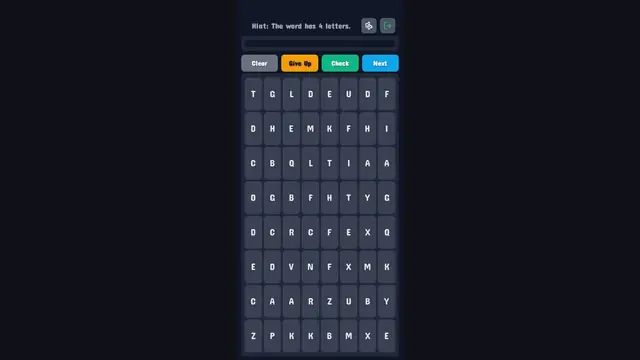
- Game type
- Puzzle – word search
- Goal
- Find the hidden word in a grid of letters, using the hint (for example "The word has 4 letters").
- Controls we used
- Click or tap letters to build the word, then use the Clear, Give Up, Check and Next buttons.
- On a phone (390px test)
- Works well: on the 390px portrait view the 8×8 grid and all the buttons were large enough to tap.
- Load time
- Under a second.
- Difficulty
- Adjustable: you pick the grid size (8×8, 10×10, 12×12 or 15×15) or a task level (Tiny Grid, Easy Fun, Medium, Hard, Expert).
- In-game ads
- Yes – the game loads GameMonetize's video-ad system (Google IMA).
- How a session plays
- Choose a grid size → a letter grid with a hint line above it → select letters → Check. Next moves on to a new word.
Our verdict: A clean, no-frills word search with sensible difficulty options. It suits a phone and is good for a calm few minutes.
How we test: we open the game in a desktop browser and in a 390px-wide phone view, time how long it takes to load, play through the opening level or round and note exactly what we saw. We only write down things we observed. More about our testing.
About Hidden Word Puzzle
Game by a third-party developer, distributed via GameMonetize. The description below is supplied by the developer; the box above is our own test.
Hidden Word Puzzle Game Challenge your vocabulary and observation skills in this classic word search puzzle! The goal is simple: find the secret word hidden within a grid of jumbled letters. With multiple grid sizes, difficulty options, and two languages to choose from (English and Russian), this game offers endless fun for word enthusiasts of all levels. Whether you have a few minutes to spare or want to dive into a longer challenge, Hidden Word Puzzle is the perfect way to keep your mind sharp.
How to play (developer instructions): Main Controls Select Letters Click or tap on mobile on individual letters in the grid to form a word The word you are spelling will appear in the display box above the main buttons Deselect a Letter If you make a mistake simply click the selected l


