Tested by Beprt
Last tested: 26 Sep 2026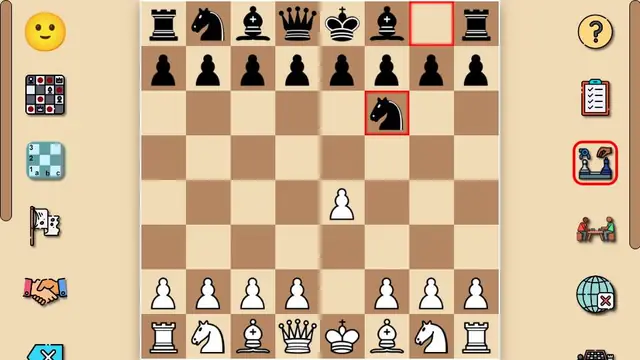
- Game type
- Board game – chess
- Goal
- Standard chess: checkmate the opponent's king.
- Controls we used
- Drag a piece with the mouse (or finger) to its new square. In our test a simple click-click did not move pieces; dragging did.
- On a phone (390px test)
- Yes. On the 390px portrait screen the full board fitted edge to edge, with the menu icons moved above and below it.
- Load time
- Board ready in about 2 seconds.
- Difficulty
- Depends on you: the computer replied instantly and sensibly (e4 was answered with Nf6).
- In-game ads
- Yes – the GameMonetize video-ad system (Google IMA) loads with the game.
- How a session plays
- The game opens directly on a board in "vs computer" mode. Icon buttons offer two players on one device and online play (we did not test online), plus board style, coordinates, a move list and draw/resign options.
Our verdict: A plain, uncluttered chess board that works well on phones, with a computer opponent and a same-device two-player mode. Good for a quick game.
How we test: we open the game in a desktop browser and in a 390px-wide phone view, time how long it takes to load, play through the opening level or round and note exactly what we saw. We only write down things we observed. More about our testing.
About Classic chess
Game by a third-party developer, distributed via GameMonetize. The description below is supplied by the developer; the box above is our own test.
Classic chess is a two-player board game played on a chessboard with 64 squares arranged in rows of an 8x8 grid. Each player starts with 16 pieces: including a king, one queen, two knights, two rooks, two bishops and eight pawns. The goal of this chess game is to checkmate the opponents king, putting him in imminent danger of being captured. The game can be played with artificial intelligence or together with another person on the same device. The game also has the ability to solve chess problems.
How to play (developer instructions): Mouse click or tap to play